
 Posted by
 How to Check Your Filer / ATL Status in Pakistan (2026)
Want to confirm whether you’re a filer before a property deal, a bank transaction, or filing season? Checking your filer status takes under two minutes.
This guide shows you exactly how to check your filer status online on the FBR portal, by SMS to 9966, and through the Tax Asaan app, plus what your result actually means.
What Is Filer / ATL Status?
Your filer status comes from the Active Taxpayer List (ATL) FBR’s official record of everyone who has filed their income tax return for the latest tax year.
If your name is on the ATL, you’re a filer and pay lower withholding tax; if not, you’re treated as a non-filer. An ATL status check simply tells you whether you’re currently on that list.
When is the ATL updated? The ATL is published every year on 1 March and is updated weekly (typically every Monday). So if you’ve just filed, your status may take a few days, until the next update to turn Active.
The Three Statuses You Might See
| Status | What it means |
| Active | You filed your return (on time, or late with the surcharge). You get filer withholding tax rates. |
| Active (Late Filer) | You filed after the deadline. You’re on the ATL, but may still pay higher rates than an on-time filer on some transactions (e.g. property). |
| Inactive / Not Found | You haven’t filed, or your return isn’t processed yet. You’re treated as a non-filer until this changes. |
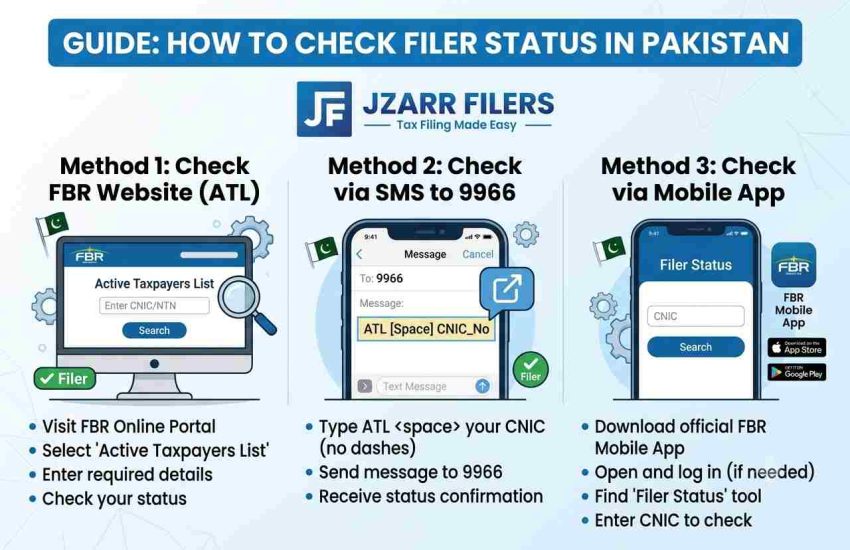
Method 1 — Check Filer Status Online (FBR Portal)
This is the most reliable method and needs no login a quick active taxpayer list check by CNIC or NTN.
- Go to the FBR website and open Online Services → “ATL (Income Tax)” (Active Taxpayer verification).
- Choose your parameter type for individuals, select CNIC.
- Enter your 13-digit CNIC (no dashes).
- Complete the captcha and click Verify.
Your status Active, Inactive, or Not Found appears instantly, along with your name to confirm it’s really you.
Method 2 — Check Filer Status by SMS (9966)
No internet? Use FBR’s SMS service on shortcode 9966. Use a non-ported SIM for reliable results (works on Jazz, Zong, Telenor, Ufone).
| To check | SMS format → send to 9966 |
| Individual filer status (by CNIC) | ATL (space) 13-digit CNIC (no dashes) → 9966 |
| AOP / Company status (by NTN) | ATL (space) 7-digit NTN → 9966 |
| AJ&K individual status | AJKATL (space) CNIC (no dashes) → 9966 |
You’ll get an automated reply within seconds confirming whether you’re Active or Inactive.
Method 3 — Check Filer Status on the Tax Asaan App
Download FBR’s official Tax Asaan app (Android or iOS), open ATL Inquiry, and enter your CNIC or NTN to see your status in real time no login needed. This is the fastest option if you prefer your phone.
Method 4 — Download the Full ATL File (for Businesses)
Need to check many people or verify a supplier? Download the latest Active Taxpayer List (Income Tax) Excel file from FBR’s ATL download page and search by CNIC/NTN. This is useful for filer verification of vendors or in bulk.
“I Filed But I’m Still Showing Inactive”
Don’t panic, this is common. The usual reasons are:
- The ATL hasn’t updated yet. It refreshes weekly (typically Mondays), so a return filed mid-week appears at the next update.
- Your return wasn’t fully submitted. Check in IRIS that both the return and wealth statement moved to Completed Task, not Draft.
- You filed late without the surcharge. Late filers must pay the ATL surcharge to be added.
- Wrong CNIC/NTN entered. Re-check the digits and remove dashes.
What to Do If You’re Inactive or Not Found
If you’re Inactive, you need to file your income tax return to become active. If you missed the deadline, you’ll also pay the ATL surcharge (Rs 25,000 for individuals in 2026) to be added to the list. For the full process, read our guides on how to become a filer in Pakistan and how to file your income tax return.
Not sure why filer status matters? See our comparison of filer vs non-filer to understand exactly what you save.
Frequently Asked Questions
Q: How do I check my filer status by CNIC?
Go to FBR’s Online Services, open “ATL (Income Tax),” select CNIC, enter your 13-digit CNIC without dashes, complete the captcha, and click Verify. Your Active/Inactive status appears instantly.
Q: How do I check my ATL status by SMS?
Type “ATL (space) your 13-digit CNIC” (no dashes) and send to 9966. For AOPs and companies, send “ATL (space) 7-digit NTN” to 9966.
Q: I filed my return but I’m still Inactive, why?
The ATL updates weekly (usually Mondays), so it can take a few days for your status to turn Active. Also confirm your return and wealth statement were fully submitted in IRIS.
Q: How often is the ATL updated?
The ATL is published annually on 1 March and is updated weekly, typically every Monday, to add new filers and remove non-compliant ones.
Q: What’s the difference between Active and Active (Late Filer)?
An Active filer filed on time; an Active (Late Filer) filed after the deadline and paid the surcharge. Late filers are on the ATL but may still pay higher rates than on-time filers on some transactions.
Q: Is checking filer status free?
Yes. Checking online on FBR and via the Tax Asaan app is free. The SMS to 9966 is free on some networks and may carry a small charge on others.
Showing Inactive? We’ll Get You Active
If your check comes back Inactive or Not Found, we can get you filed and on the ATL quickly. JZARR Filers (Karachi) handles your income tax return, NTN, and filer status end to end, so you stop paying non-filer rates.
Book your free consultation today and become an active filer without the hassle.